01. Introduction
KOTLIN PART2 L4 A01 Treasure Hunting With Geofences In Kotlin Intro
A geofence is a virtual perimeter defined by GPS or RFID around a real world area. Geofences can be created with a radius around a point location. Geofencing has a lot of applications including:
- Reminder apps, such as reminding you to pick up a prescription when you get to a certain destination like your pharmacy.
- Child location services, where a parent can be notified if a child leaves an area designated by a geofence.
- Attendance, where an employer can know when their employees arrive by the time they enter a geofence.
- A treasure hunt app that uses geofences to mark the place where the treasure is hidden, when you enter that place you will be notified that you have won! - this is what you will be making in this lesson!
Geofences have three transition types:
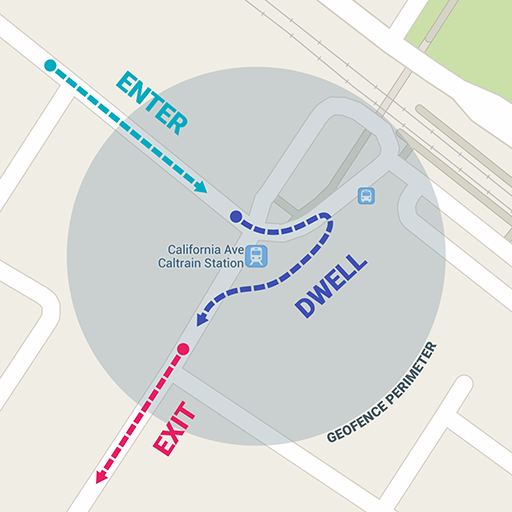
Enter: Indicates that the user entered the geofence(s).
Dwell : Indicates that the user enters and dwells in geofences for a given period of time.
Exit: Indicates that the user has exited the geofence(s).

This shows geofence locations denoted by markers and the radiuses around them.
What you'll need
- The latest version of Android Studio
- A minimum of SDK API 29 on your device or emulator. (This should still work on lower API levels but may look different)
What you'll learn
- How to check user permissions.
- How to check device settings.
- How to add Broadcast Receivers.
- How to add geofences.
- How to handle geofence transitions.
- How to mock locations in the emulator.